
Home page is the first page that opens after you log in to the system.
You can open it at any time while working with the system by clicking Home ( ) in the lower-left corner of the system window.

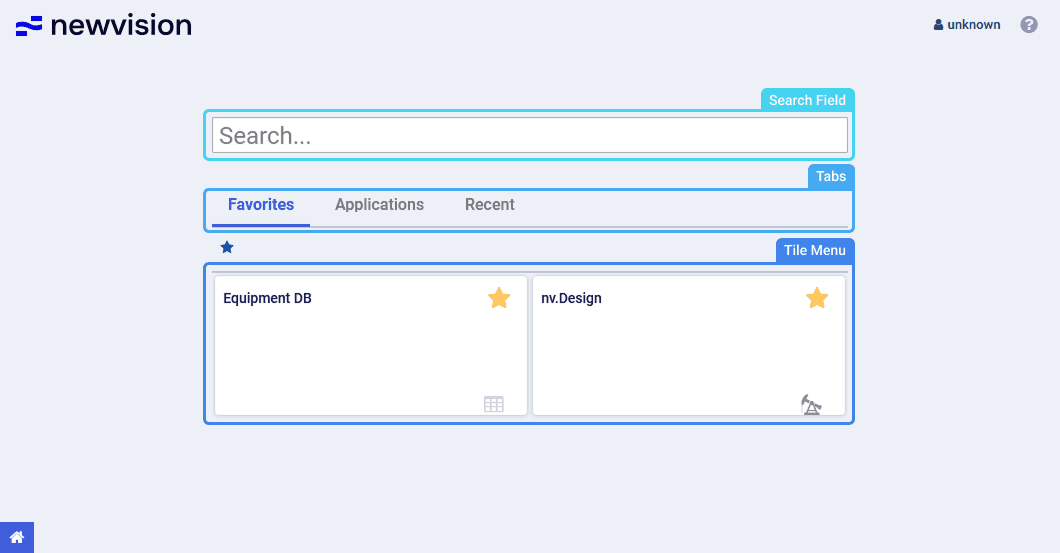
Home page contains the following components:
- Search field: Text field for searching for the required module.
- Tabs: Tabs for grouping and navigation among system modules:
Modules: All system modules available to you.
Favorites: Modules that you added to favorites.
To add a module to favorites, click the star icon in the upper-right corner of its tile. To remove it from favorites, click the star icon again.
Recent: Modules that you opened recently.
- Tile menu: Modules represented as tiles for quick access to the system modules.
To open a module, click the corresponding tile in the tile menu or use the main menu instead.
To close a module, click the cross icon ( ) in the right part of the corresponding tab in the tab bar.

For details, see .